You may use your Google Account to access a variety of Google services. With a Google Account, you can use Gmail to send and receive emails, search YouTube for new videos to watch, download applications from Google Play, play songs on Google Play Music, and do a lot of other activities. You may need to remove your Gmail account from your realme smartphone or any Android device for the matter.
There are a variety of reasons why you would want to delete your Gmail account from your phone. Perhaps you’re upgrading to a new smartphone and selling your old one, or you’re ready to loan your gadget to someone for a limited time, and you don’t want anyone else to have access to your Gmail account in any case.
If that’s the case, there are only a few actions you’ll need to perform to get rid of Gmail or Google accounts. This post will guide you on how to remove a Google or Gmail account from realme smartphones. Also, check out our other posts for realme related information.
- Realme PC Connect Latest Version: Download, Eligible Devices, Features
- These Realme Devices Support Dynamic RAM Expansion (Virtual RAM)
- Download Realme Music Party Latest Version APK for Realme Smartphones
How to Remove Google or Gmail Account from Realme Smartphones
It’s worth noting, too, that if you delete the account from your phone, all of the information on the device would be lost. This means you won’t be able to access items like emails, contacts, settings, app data, and more synchronized with the account. As a result, backing up all of your data before deleting the account from your smartphone is always a good idea.
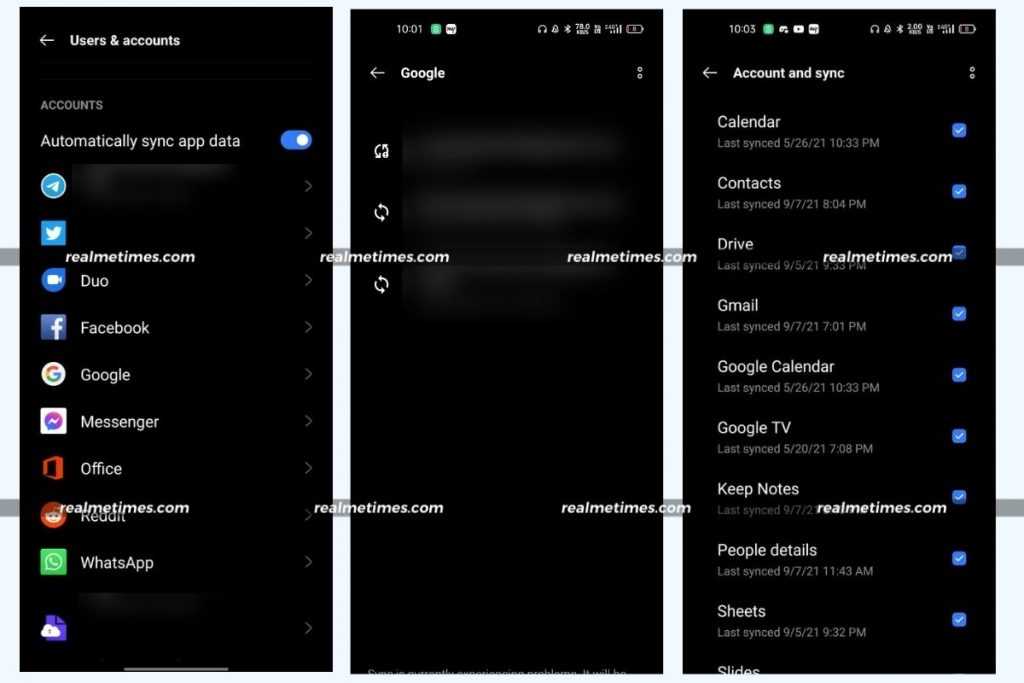
- On your realme smartphone, open the Settings application.
- Now, navigate to the User and Accounts section.
- Here, choose the type of account to be removed, which is Google in our case.
- Next, please tap on the Google Account to remove it from the device.
- Moving ahead, choose the three-dotted icon present at the top right corner and choose Remove Account.
That said, how many accounts do you have on your realme smartphone? Do let us know by dropping a comment down below.